- Neue Version von WPML WordPress 7.1.1, Security Fixes Post Archive: Anzahl der Beiträge wird angezeigt. Kategorien und Schlagworte ohne Filterergebnise werden nicht mehr als Filteroptionen angezeigt. So schränkt man nur auf auch vorhandene Taxonomiebegriffe ein. Post-Listings Kategorien […]
- Gravity Forms 3.0.1 mit besserer Accessibility WCAG 2.1 AA compliant, internationalen Telefonformaten IdM Person Mailadresse in jedem Fall sichtbar, so wie im Idm auch Youtube widerrufen beim Video funktioniert nun im Modal des Videofensters. Klicken Sie auf […]
- You fill out the form for the website you want to move (below under “Request website”).
- You will receive a new website on the new server pre-filled with the template you have selected.
- You set up your website using the checklist and fill in the template with your data.
- Your new website is public. No one should see the intermediate status of your website: Set to private works for all pages via dashboard > Pages > check all > Click on Edit for multiple actions > Take over > Status > Private > Aktualisieren. Attention: Set links, assign parent page, integrate in menu only works for public pages, not for private pages. Draft also works. Password-protected does not really work.
- Which web addresses should also be found after the move? Avoid “Page not found”. Name the pages exactly as they were on the old website. The effect is then almost like a redirect to the old website!
If the page content on the new website is contained on another page, you can temporarily link to this other page from a newly created page with the same URL.
This makes it easier for users and search engines to find the content on the new website. Delete pages that only contain such a link after a few weeks. - Never link “back” to your old website! The addresses of all old pages and files change when you move from yourwebsite.uni-mainz.de/pfad/ to www.blogs.uni-mainz.de/pfad and are therefore no longer accessible.
- You can move intern information to Sharepoint. You can find more information here Teamweb: Documentation and FAQ | Center for Data Processing (uni-mainz.de)
- The English version should move at the same time, otherwise there will be chaos in the links of the English version.
- If you want to keep the website permanently locally for archiving purposes, back up the old website using httrack, for example. If you only need the old website for some time after the move to look something up and compare, this is unnecessary, as the old website will remain intact for months!
- You are finished with the move and notify us that the address can now be moved. Allow 2-3 working days for the address change to be distributed on the Internet.
- By now at the latest, your new pages must no longer be private . Otherwise you will receive a “Page not found 404 error” after the address change.
- We are moving the web address of the old website to the new one.
- The old website is now protected from public access. Only pages are protected, not items. You can reach your old website at: https://www.blogs.uni-mainz.de/subsite-teilen-wir-ihnen-mit
- The old website with all its files will be retained and thus represents a complete data backup at the time of the move!
- We will email you the access link after the move has been completed.
- Last step: full deletion of the old site after three months.
- These websites already use the new layout (as of February 2025)
You should reuse the URL of your web pages. If the trailing part of the URL is identical in the old and new websites, you will achieve a search engine-friendly move without “File not Found” errors!
All addresses and their names for monolingual websites:
Before the move:
- Old website:
- Primary domain:
ihrinstitut.uni-mainz.de - Subsite address (invisible):
www.blogs.uni-mainz.de/dies-bekommen-sie-von-uns
- Primary domain:
- New website:
- Subsite address:
cms.zdv.uni-mainz.de/dies-bekommen-sie-von-uns - Login:
cms.zdv.uni-mainz.de/dies-bekommen-sie-von-uns/wp-admin
- Subsite address:
After the move:
- New website:
- Primary domain:
ihrinstitut.uni-mainz.de - Subsite this address remains invisible:
cms.zdv.uni-mainz.de/dies-bekommen-sie-von-uns
- Primary domain:
- Old website:
- Subsite address: www.blogs.uni-mainz.de/dies-bekommen-sie-von-uns, this address will remain with all data for 3 months after the move.
- Login: www.blogs.uni-mainz.de/dies-bekommen-sie-von-uns/wp-admin
- Links within the new pages are retained even after the primary domain has been moved, the new address is added.
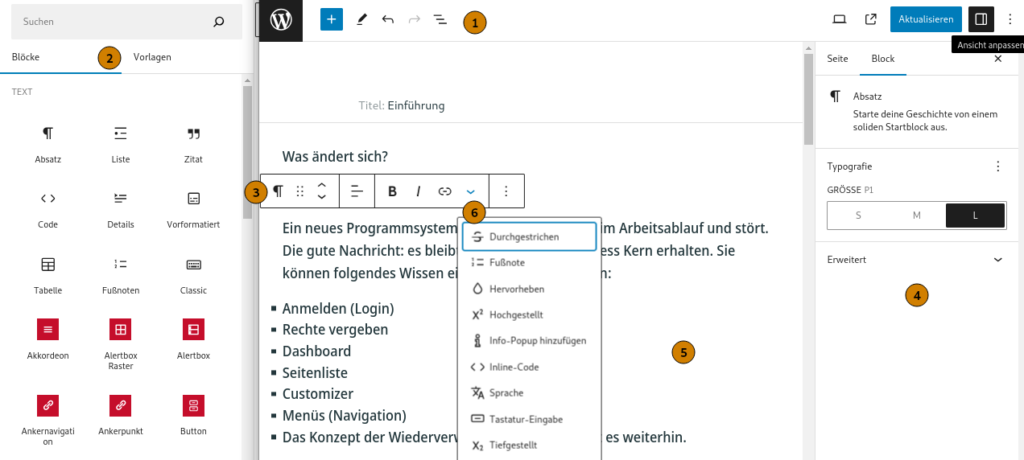
Instead of the Classic Editor with the format bar, use the Gutenberg block editor, which has been the standard in WordPress for years. We use the Classic Editor in the old multisite. The editor is one of the biggest differences between the two multisites at www.blogs.uni-mainz.de = ALT and cms.zdv.uni-mainz.de = NEU
Each page consists of blocks. The block list describes the block and refers to the detailed instructions with examples in the demo website and the video instructions.
Blocks that dynamically display data from other systems such as FIS = publication lists, IdM = persons and organizational structures, Jogustine = courses are particularly labour-saving.
The templates save you time and work because you overwrite the existing content with your data. You select a template in the proposal for a website:
If you are moving or would like a new website in the JGU layout, please fill out the following proposal:
We can set up multilingualism at your request. WordPress Multilingual = WPML automatically translates your texts.
- The page you requested is not accessible from your browser. Please use a workspace PC in your office at Johannes Gutenberg University Mainz or use the remote desktop connection: This error message appears if you are working from outside JGU and VPN is not switched on. The message also appears if you have saved a page as a draft. Then they will try to log you in and THAT can only be done with VPN, RDV, or directly at JGU.
- Page not found 404: the page is still marked as private. You can only access it if you are an editor and logged in.
- Write permissions: in the dashboard > JGU Tools > Users, the persons with access to the authorization resource are displayed. These persons manage the write permissions via Account.uni-mainz.de > Permissions > Resource web page. Administrators means the rights managers, “Edit content” means the people in the editorial department. It is sufficient to enter users in the correct group at account.uni-mainz.de. Clicking on the ‘Update user list’ button is no longer necessary in the new WordPress.
- Hyphenation: is switched off. The soft hyphen or the conditional hyphen
works if it is written in the code. On the Mac\u00ADdirectly in the editor - Colors are missing: The background colors of the blocks are limited to the colors specified in JGU’s corporate design.
- Use your own icons: This is technically feasible in principle, but not yet possible at present.
- Intranet function: Find in Teams, LMS, Sharepoint, depending on the use case.
- Download Center: Where to put the downloads?
- Old multisite will be shut down: no date has been set yet
- Re-launch /ˈriːlɔːnt͜ʃ,/ is what your website got with the move 😉
- Courses – everything to do with operation: We provide instructions and training, are there for you in question hours and forums, and help in the event of errors.
- Newsletter subscription: Mailing list (open newsletter) for information on the block-based layout. Start the subscription by sending an e-mail with the subject subscribe jgu-cms to sympa@lists.uni-mainz.de.
- WordPress forum: Ask your questions about the operation of WordPress, watch the problem solving in the WordPress forum, which takes place via BBB: https://bbb.rlp.net/rooms/slo-mk5-tdt-xe0
- WordPress Instructions Layout 2012 with shortcodes and three-column standard layout.
- Coordination web pages: Ask organizational and content-related questions in the web page coordination group (accessible with a JGU account). It meets every two weeks on Mondays from 12-13 o’clock. If you are interested, please contactbei:cio@uni-mainz.de.
We meet on the first Monday from 11am to 12pm and on the third Thursday from 10am to 11am for an hour about WordPress.
- 21.5. Donnerstag 10 Uhr WPML Engines
- 1.6. Monday 11 a.m.
- 18.6. Thursday 10 a.m.
- 6.7. Monday 11 a.m.
- 16.7. Thursday 10 a.m.
- 3.8. Monday 11 a.m.
- 20.8. Thursday 10 a.m.
- 7.9. Monday 11 a.m.
- 17.9. Thursday 10 a.m.
- 5.10. Monday 11 a.m.
- 15.10.Thursday 10 a.m.
- 2.11. Monday 11 a.m.
- 19.11. Thursday 10 a.m.
- 7.12. Monday 11 a.m.
- 17.12. Thursday 10 a.m.
You will certainly notice that there are always incomplete or incorrect things. With the amount of blocks and functions, the nesting possibilities and the resulting interactions, a team of web programmers is needed to fix all errors and fulfill all wishes.
We have recorded several hundred errors and are working through them one by one, always keeping an eye on performance, accessibility and data security.
Current issues that we would like to resolve as quickly as possible:
- Optimizing posts for social items: open-graph (og) featured pic
- Category and keyword pages that can be selected in the menu do not yet work and are not displayed in the menu. There is a similar function through the blocks: Post Listing (=Post Listing), Closed Stacks, Post Archive
- Font sizes and types, alignment: Several sizes are offered in the layout. The font is predefined by the layout. You should leave the default left-aligned alignment as it is.
- Font colors: The default font color is black on white. This is specified by the JGU layout and should not be changed.
- Text alignment: should be and remain left-aligned. Centered looks strange, and justified text is illegible and cannot be compared with the justified text on a printed page.
- Image scaling: Anything over 1200 pixels wide is usually unnecessary.
- Layout in general: do not confuse a website with the design options of e.g. Word, PowerPoint or image editing software. The web page is there to publish content. You cannot check the display on every device and in every window size. Do not worry about the layout. This is predefined and should not be changed artificially and with effort. This will make life difficult for the editors who follow you.
Shortlink for this page: https://jgu.to/zdv/wordpress| The English page was translated with DEEPL.

